
Nectar DXP Release 25 isn’t handing you more data. It’s handing you the answer.
When calls fail, the problem is rarely a lack of information. For years, Nectar has gathered correlated data from other vendor consoles and surfaced them in a consolidated view. The problem wasn’t getting the data, but it was more about getting the answer quickly. R25 changes that. DXP now tells you what matters, why it matters and what to do next.
Insights everywhere: the answer, not just the data
R25 introduces a new way of presenting data across DXP. Every insight follows the same simple pattern:
- The finding: what is failing and where
- The evidence: why it is abnormal, not background noise
- The likely cause: what it usually means and what to check first
- One click to the data: straight to the affected calls
That finding is the same wherever you work. It appears on the DXP screens your teams already use, ranked worst first. It flows through the APIs into ITSM tools, automation and partner portals. And it reaches AI assistants through the DXP MCP server, so a question like “why are calls failing in Chicago?” gets an answer instead of just the session data.
The right data for the right people
Organizations have tighter control over who sees what, without extra admin work.
Access that follows your org chart. Security groups are now built into DXP filters and role-based access for Microsoft Teams, Genesys, Webex and Zoom. Your EMEA service desk sees only EMEA users. As people join or leave the group in your identity platform, DXP stays in step automatically.
Every diagnostics deployment in one place. Larger organizations often run Nectar Diagnostics in several data centers or regions. A single tenant now supports all of them, so teams can compare sites side by side and jump straight to the right capture.
Monitor only the users who matter. Partial User Monitoring now covers Cisco Webex Calling, alongside Teams and Zoom. Start with executives, agents and front-office staff, pay only for those users, and expand as the value is proven.
Faster answers to everyday problems. A few improvements that save real time:
- One person, one record – Users who appear on several platforms now show as a single profile led by their Active Directory identity.
- See where each call leg ran – The Conversation Journey timeline now shows the signalling IP and location for every step, so the network team knows exactly which hop failed.
- Catch the two bad minutes – WebRTC sessions now show quality minute by minute, alongside endpoint CPU and memory. A call that broke up when the agent’s PC hit 95% CPU goes to desktop support, not the network team.
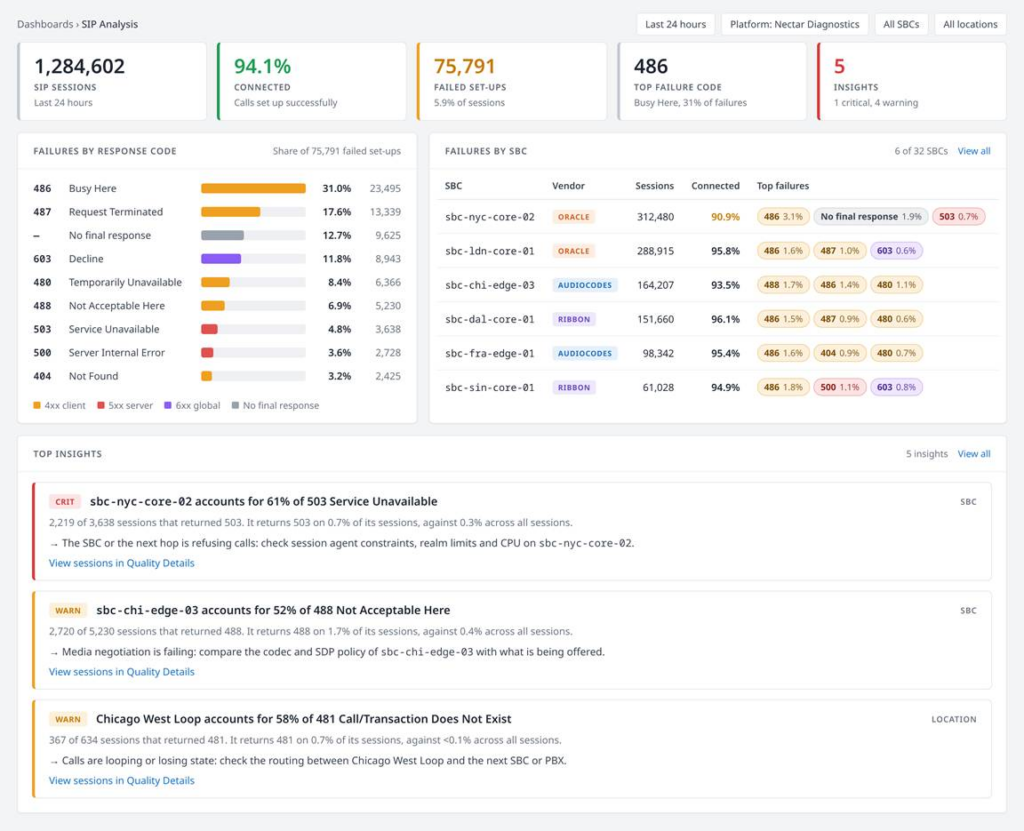
From SIP failures to clear next steps
When calls fail, the SIP response codes and the SBCs that carried them hold the answer. Until now, that answer lived in different places.
SIP Analysis. A new dashboard shows SIP outcomes across your entire estate. Failures are broken down by SBC, carrier peer, location and signaling path, and every number links straight to the calls behind it.
Insights that do the digging. Instead of a table of response codes, DXP tells you what stands out. For example: one SBC accounts for 61% of 503 errors, here is how that compares with the rest of your estate, and here is what to check first. DXP even flags paths where calls connect but quality suffers. Just as important, DXP tells you when a failure is not a fault. High busy or decline rates on a contact center trunk are usually a business outcome, not a network problem. That stops teams chasing issues that are not there.
One view for every SBC. AudioCodes and Ribbon now join Oracle with full SBC dashboards. A mixed-vendor estate runs from one Recommended Actions list, worst first, covering capacity, failover protection and certificate expiration.
Is it the SBC or someone else? SIP failures and SBC health are now linked. If a carrier peer is failing calls while the SBC sits at 0% CPU, the team takes the evidence to the carrier. If 503s climb while the SBC runs hot, the team adds capacity before customers notice.
Built for service providers
DXP is even easier to deliver as a managed service at scale.
One capture point, many customers. Tenant Data Distribution lets a provider run a single Nectar Diagnostics deployment and route each customer’s SIP data to its own tenant. Every customer gets SIP-level visibility without a separate deployment for each.
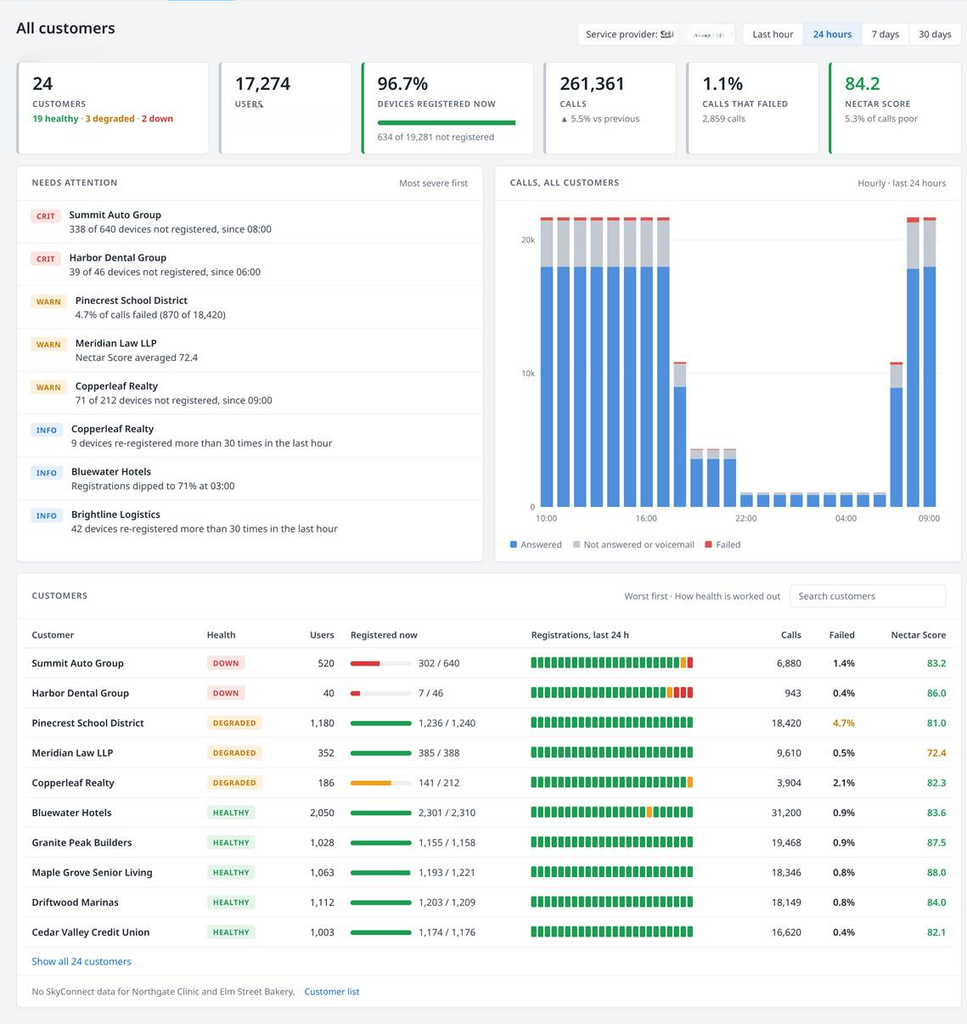
A starting view across every tenant. The first dedicated MSP view gives operations teams a landing page across all managed customers, covering users, registrations, call quality and call volumes. When one customer’s registrations drop, the team drills straight in and calls the customer before the customer calls them.
Your brand, front and center – White-label improvements across labels, emails and navigation help partners present DXP as their own.
What comes next
Release 25 is the foundation for the next phase of DXP: AI and machine learning built into the platform.
Coming in 2027, DXP will learn what normal looks like for every tenant, site and trunk, then alert when behavior departs from it. No manual thresholds. Less noise from normal peaks. Problems caught overnight, before the business day starts.
Those baselines and anomalies will arrive as insights in the same form as R25’s. Whether the consumer is a person, a partner portal or an AI assistant, they get a ready-made finding instead of a pile of data.
Get a first look
All features will be rolled out by the end of November and we can’t wait to show it off.
To see R25 in action, contact the Nectar team for a demo.